now it's theirs
// a card, offered properly
Ready for testers · iPhone and iPad
Hand someone your card. Properly.
Paper cards get lost in a pocket, and contact apps turned the whole thing into a link. Prime Introduction puts your card on your screen, turns it around to face the other person, and gives them a code their camera reads. Your details land in their Contacts. They need no app and no account, and neither do you.
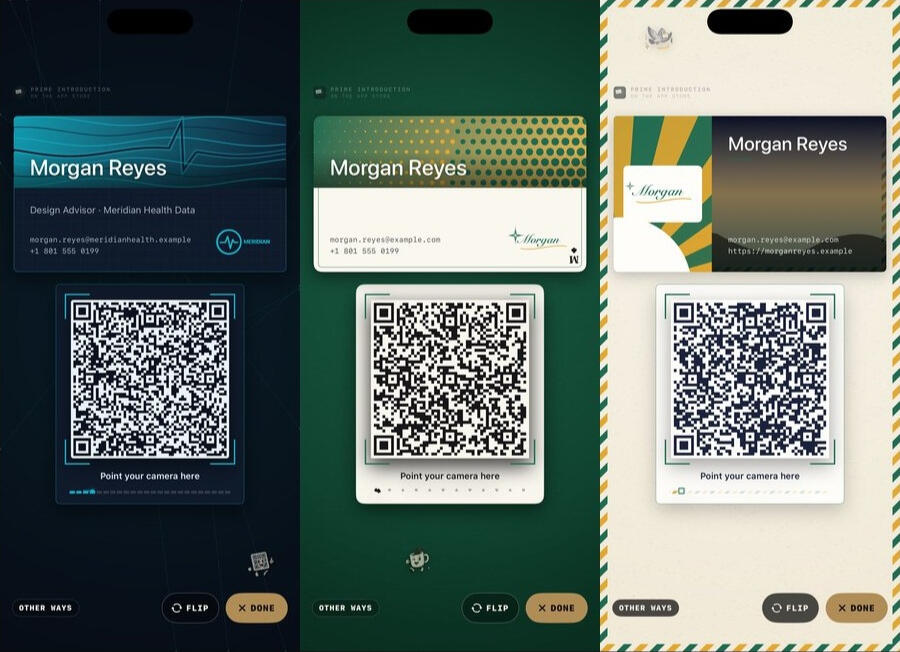
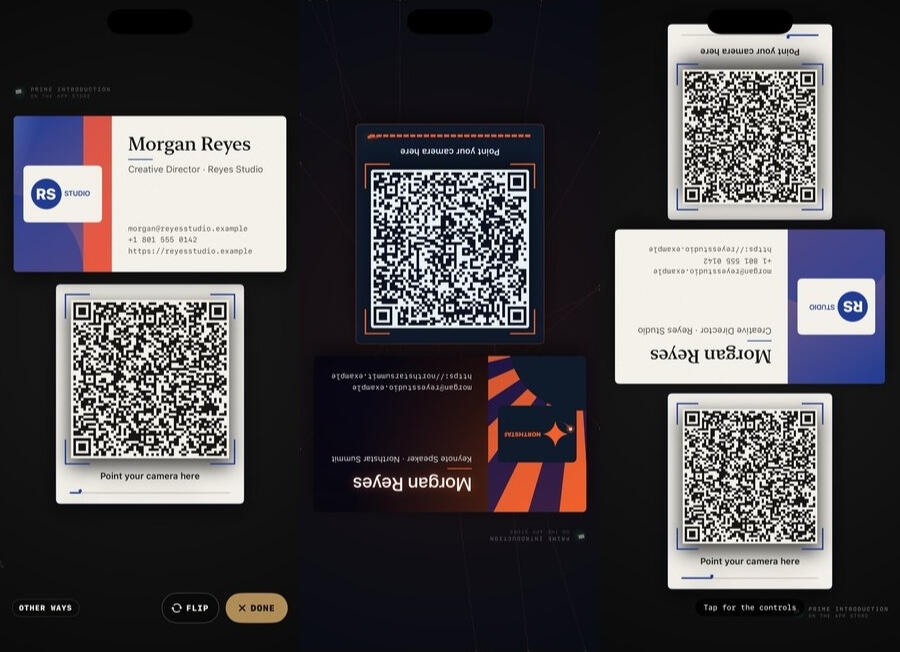
The hand-off, in three screens.
- It arrives.Your card, facing you, with the code under it.
- It turns to them.A beat, a lift, and it faces the person across from you.
- Or lay it down.A code for each side of the table, and the card turns itself so everyone can read it.
Real screens from the app, with an example card for somebody who does not exist.
Four moments it is for.
- 🤝Across a tableSomebody asks for your card and you have not carried paper in years. Tap Introduce me. That is the whole process.
INTRODUCE ME
- 🍽️Everybody at onceA dinner, a meetup, four people who all want it. Lay the phone flat and put a code on each side.
up to four codes
- 🪧The boothAn iPad on a stand, offering your card to whoever walks by, all day, with the screen kept awake only while it is doing that.
booth mode
- 🗂️The paper card someone hands youScan it in a second. The picture waits in a private pile until you decide: Contacts, or the bin.
1 to sort
Make it look like you.
Five styles, each with its own way of arriving, and twenty-three templates to start from. A company's brand kit carries its exact colors and approved logo onto every card that uses it, and anyone without a logo can pick one of twelve marks drawn in their own colors.
- SignalGlass and a heartbeat line.
- High CardFelt, dots and a little swagger.
- AirmailStamped, striped, sent.
- names & titles
- phones
- emails
- websites
- addresses
- social profiles
- a photo
- your logo
- which of these each card shares
One private list of your details, many cards made from it. A card for work, one for the side project and one for an event each share only what that moment needs, and you never type your email twice.
A stand at a booth.
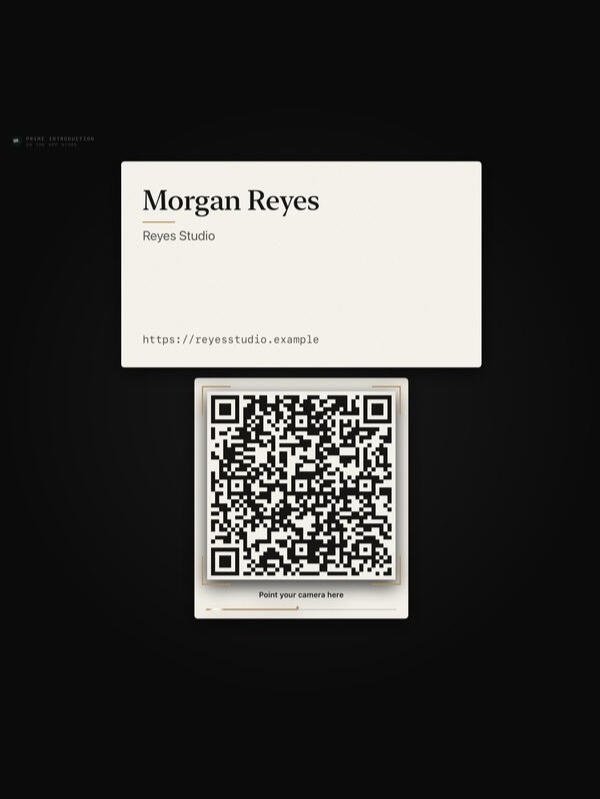
Put an iPad on a stand and it offers your card on a loop: the attention moment, the card, the code, again. It stays awake only while it is presenting, and you can pause it with a tap. On a phone the same loop runs whenever you want the card to keep offering itself.
The iPad, in booth mode.
Handed a paper card?
Scan it. Apple's document camera squares it up, and the reading is done on your iPhone: name, title, company, phones, emails. Every field is shown to you before anything is added, because a scanner gets things wrong and you get the last word. Then it goes into Contacts, or into a pile to sort later, or into the bin, with a small ceremony for the bin. Anything you throw away waits thirty days in Recently discarded before it is really gone.
Your details stay with you.
Your cards, your details and the cards you scan are kept on your own iPhone. There is no account, and no server of ours for anything to go to. What does leave the phone is what you hand over, when you hand it over:
| When | What leaves your phone | Where it goes |
|---|---|---|
| Someone scans your code | The details that card shares, and nothing else: no photo, no logo, no link back to you | Their camera, straight into their Contacts |
| You tap Other ways and send it | A contact file of the same details | Wherever you send it: AirDrop, Messages, Mail |
| You export a card or everything | A file you can open without this app | Wherever you save it in Files |
| You buy something | The purchase | Apple, who handle the payment |
What none of that is for: the other person's details never come back to us, the app has no analytics and no advertising identifier, and there is no profile of you anywhere but your own phone. It is not a CRM: no follow-up reminders, no lead scores, no dashboards.
Yours to take with you.
- Export any time. A card as a contact file, or a card with its whole look as a
.primeintro.jsonfile you can open again on another phone. Everything at once goes to Files, readable without this app and without us. - No account and no login. Nothing to sign up for, and the person you hand your card to is never asked for anything.
- We never sell personal data. Not aggregated, not anonymized, not to a broker — and a feature only ever uses the least data it needs to do the job you asked for.
- Nothing you have paid for ever moves behind a new price.
- One purchase, made once, for anyone with a fourth card: unlimited cards, and the controls for Lay it down — which way it faces, how long each side shows, how fast it turns. Nothing already made is ever locked.
- The Holiday Pack is a one-time purchase that dresses your card for the holidays on their days. It is decoration and unlocks no features, and you can see it before you buy.
- Apple shows you each price before you buy, and both restore on a new phone without an account.
Prime Introduction is built, and it is not on the App Store yet. The first tester build is waiting on Apple's side of the paperwork, not on the app. Two things are built around and switched off until then: syncing through your own iCloud, and writing your card to an NFC tag you own. When they are on, this page will say so.
Prime Introduction — Support
A business card you hand over on your phone, and a place for the paper ones you are handed.
The app is small enough to learn by using it, so this page answers the questions people ask before they trust an app with their contact details. Anything else, write to us using the form below.
Or just write to us.
There is one person behind this shop, and he reads everything that comes through this form. Three kinds of message are all welcome, and they all arrive in the same place:
- Something is wrong with the app. Tell us which card and which screen, and what you expected instead. A paper card the scanner misread is the single most useful thing you can send.
- Something is missing. If your trade has to print a line on its cards, or your company hands out a brand guide the app cannot use yet, say so.
- You want software built. Not only iPhone apps. If the thing you use every day at work is worse than it should be, describe it and you will get a real answer about whether it is worth building. Quotes are free and the first reply is a person.
Your name, your email address and your message go to Carrd, who host this page, and Carrd emails them on to the shop. They are used to answer you and nothing else. The full account is in the privacy policy below.
Common questions
- Does the other person need the app?
- No. The code on your screen is a standard contact card. A phone camera reads it and offers to add you to Contacts, with no app and no account. If a camera will not cooperate, Other ways sends the same details as a contact file by AirDrop, Messages or Mail.
- What is in the code?
- Only the details that card shares: the name, and whichever phones, emails, websites and addresses you ticked for it. Your photo and logo stay on the screen and never go in the code. A card with fewer details makes a simpler code, which scans from further away.
- Why does my card turn around?
- So the person across from you can read it. It arrives facing you, waits a beat, then turns to face them, the way you would hand over a paper card. Tap the middle of the card to turn it again; tap the edge of the screen to bring the buttons back.
- What is Lay it down?
- For a table: put the phone down flat, and there is a code for each side, up to four. Tap Arrange to drag, resize and turn them. The card turns itself every few seconds so everyone can read it. Upright and sideways each keep their own arrangement.
- It misread a paper card.
- Correct the field before you add it; every field is shown to you first for exactly this reason. If a particular card defeats it, tell us what it said and what it should have said. The reading happens on your phone, so that is the only way it improves.
- How many cards can I make?
- Three, free, for good, and the examples the app comes with do not count toward them. A one-time purchase makes it unlimited and adds the controls for Lay it down. Nothing you have already made is ever locked.
- Can I move a card to another phone, or give a colleague the same look?
- Yes. Export a card from its editor and you get a
.primeintro.jsonfile with the details, the look and the brand kit, logo included. Open it on the other phone, or start a new card from it. Settings ▸ Your data exports everything at once to Files. - Does it sync between my iPhone and my iPad?
- Not yet. Syncing through your own iCloud is built around, and switched on once Apple finishes its side of setting the app up. Until then, a card file moves a card between devices.
- Can it write my card to an NFC tag?
- Not yet, for the same reason. When it can, it writes to a tag you already own; a phone tapped to it opens a page that reads your card out of the tag itself, and that page never receives your details.
- What is the Holiday Pack?
- A one-time purchase that dresses your card for the holidays on their days. It is decoration and unlocks no features, and you can see it before you buy. Apple shows the price first, and it restores on a new phone with no account of ours.
- Does the app track me or show ads?
- No analytics, no tracking, no advertising identifier and no account. What does leave the phone, and when, is listed in the privacy policy.
Prime Introduction — Privacy Policy
Last updated 23 September 2026
Prime Introduction has no account and no Prime Introduction server. Your details, your cards, their looks and the paper cards you scan are kept on your own iPhone or iPad. Nothing you put in is sent to the developer, because there is nowhere to send it. Nothing about you is sold.
The whole point of the app is to hand your details to somebody, so rather than claim that nothing ever leaves the phone, every occasion is listed below with what it carries. Each one happens because you did something, and none of them reaches us.
What the app stores, and where
- Everything you put in — your names, titles, phones, emails, websites, addresses and social profiles; your cards and which details each one shares; brand kits, logos and photos; and the paper cards you scan, with their pictures — is saved in a database on your own device.
- This version does not sync. Syncing through your own iCloud is built around and switched off, because Apple's side of setting it up is not finished. When it is switched on, it will use Apple's private database for this app, in your own iCloud, and this page will say so first.
- A paper card you throw away waits thirty days in Recently discarded, where you can bring it back, and is then deleted.
- Export writes files you choose to save: a card as a contact file, a card with its whole look as a
.primeintro.jsonfile, or everything at once from Settings ▸ Your data. Where you put them — Files, iCloud Drive, a message — is your own action through iOS. They never pass through us. - Deleting the app removes what it kept on the device. Anything you exported stays where you put it.
Permissions the app may ask for
- Camera — only when you scan a paper card. Apple's document camera finds the card and squares it up, and the reading is done on your device by Apple's text recognition and, on phones that have it, Apple's on-device language model. The picture is kept in the app with the card you scanned, and it is not sent anywhere.
- Photos — only to read a card from a photo you already took, or to pick a logo or a photo for your card. Apple's picker runs outside the app and hands it only the image you choose.
- Contacts — only when you ask to update a contact you already have with the details from a scanned card, so the app can find that contact and change it. Adding a new contact, and filling your own card from your own contact, use Apple's contact screens, which run outside the app and need no permission.
- NFC — not used by this version. When it is, it will be only while you write your card to a tag you own.
Everything that leaves your device
This is the complete list. Each one happens on your action, and each carries only what is named.
- Someone scans your code — the code is drawn on your screen, not fetched from anywhere, and it holds the details that card shares and nothing else: no photo, no logo, no link back to you. Their camera reads it and their phone offers to add you to their Contacts. It does not go through us, and we never learn who scanned it.
- Other ways — sends a contact file of the same details through Apple's share sheet, to whoever you choose, by AirDrop, Messages, Mail or anything else you have installed.
- Buying something — handled entirely by Apple. The developer never sees your payment details.
The app has no analytics SDK, no advertising SDK, no advertising identifier and no third-party tracking. Nothing in the list above happens on the app's own initiative, in the background, or at launch.
The other person
The person you hand your card to is never asked for anything. They do not need the app, an account or a web page, and nothing about them comes back to your phone or to us. A paper card somebody hands you stays on your device until you decide what to do with it.
What is never done
Nothing about you, or about the people whose cards you keep, is sold, rented, or handed to a data broker — not aggregated, not anonymized, not “with a trusted partner”. The app is not a CRM: there are no follow-up reminders, lead scores, engagement analytics or dashboards, because none of them are needed to hand somebody a card.
The two rules behind all of this
Everything above is what this version does today, and it can be checked. These two are the standard the next decision gets held to:
- Nothing about you is sold, rented, or handed to a data broker.
- Only the least data a feature needs to work, and only for that feature. If something has to leave your device to do a job you asked for, it is the smallest thing that does the job, it is named on this page, and it is not kept or used for anything else.
How future decisions get made
Everything above describes the app as it is today, and every line of it can be checked. Two things are planned and not switched on: syncing through your own iCloud, and writing your card to an NFC tag. A phone tapped to such a tag opens a page on the shop's site that reads your card out of the address itself; that part of an address is never sent to a server, so the page never receives your details. Both will be described on this page before they ship.
If this app ever needs a third-party service, or a kind of data it does not take today, that choice gets made for the person using it rather than for the revenue, it will be described here before it ships, and it will be switchable off wherever it can be.
Purchases
Prime Introduction is free, and complete: three cards and everything they can do. One optional purchase, made once, allows unlimited cards and adds the controls for Lay it down. The Holiday Pack is an optional one-time purchase that dresses your card for the holidays; it adds decoration, never a feature. Apple shows you each price before you buy, and Restore purchase brings them back on a new device by Apple Account, with no account of ours. This version has no subscription in it.
Children
Prime Introduction is not directed at children and collects no personal information from anyone.
Changes
If this policy ever changes, the updated version will be posted at this address with a new date at the top.
Writing in
Contact is a form on this page rather than an email address. What you type into it — your name, your email address and your message — goes to Carrd, who host this page, and Carrd emails it on to The Butcher Shop LLC. Carrd handles that delivery, and their own privacy policy covers that step. The message is used to answer you, and the reply comes from the person who made the app. The app itself has no part in this: writing in sends nothing from your device, and nothing you say in the form is joined to anything in the app.
Contact
Questions about privacy in Prime Introduction: Send us a message.